Direct archive access
The Direct Archive Access module lets you load data from any local or remote archive of CDF or NetCDF files directly into Speasy — no web service required. Other formats (HAPI, plain text, your lab’s own binary format…) are supported through a pluggable codec system — see Supported file formats below.
This is useful when:
You have your own data files on disk or on a lab server
A public archive (e.g. CDAWeb) hosts files you want to access directly rather than through an API
You want to share a dataset configuration with colleagues
Once configured, the data appears in Speasy’s inventory and can be loaded with spz.get_data() like any other product.
How it works
Most space physics data archives follow a simple pattern: files are organized in folders by date
(e.g. one CDF file per day, stored in yearly or monthly directories). Speasy exploits this predictable
structure. You describe the URL pattern and file organization in a short YAML file, and Speasy handles the rest:
it figures out which files to download for a given time range, loads them, and merges the results into a
single SpeasyVariable.
Note
The data files must follow the ISTP (International
Solar-Terrestrial Physics) CDF/NetCDF conventions — a standard set of metadata attributes
(DEPEND_0, UNITS, FILLVAL, …) that most public space physics archives, including
CDAWeb, already use. For non-ISTP files or other formats, see Adding support for a new file format below.
Supported file formats
Format |
|
Notes |
|---|---|---|
CDF (ISTP) |
|
Built in, no extra dependency. Default when |
NetCDF (ISTP) |
|
Requires the optional netCDF4 package
( |
HAPI CSV |
|
Works with inline |
HAPI Binary |
|
Same limitation as HAPI CSV. |
Anything else |
a name you choose |
Write your own codec — see Adding support for a new file format. |
Every spelling that resolves to the same codec is interchangeable: a codec registers itself under
its own name plus each of its declared extensions and MIME types, and any of those keys works
as a codec: value. For the two ISTP codecs the registered name happens to be the class name,
so codec: IstpCdf and codec: IstpNetCDF work too — that is a property of those codecs,
not a general rule, and your own codec will only answer to the name it declares. Resolution is
a flat, case-sensitive lookup over a single shared namespace, so pick a distinctive name.
Quick start: adding a dataset
Step 1: Find the inventory directory
Create a YAML file (e.g. my_datasets.yaml) in Speasy’s user inventory directory.
On Linux this is ~/.config/speasy/archive/, on macOS ~/Library/Application Support/speasy/archive/
(the LPP author segment only appears in the Windows path, %LOCALAPPDATA%\LPP\speasy\archive).
The directory doesn’t exist until you create it, and only files ending in .yaml or .yml are
loaded. You can confirm the exact path:
>>> import speasy as spz
>>> print(spz.data_providers.generic_archive.user_inventory_dir())
Tip
Want a working file to start from? Speasy ships one, themis_cdpp.yaml.example,
describing 55 THEMIS L2 datasets hosted at CDPP. Copy it into the directory above, drop the
.example suffix so it gets loaded, and restart Python. Its location:
>>> import os, speasy
>>> print(os.path.join(os.path.dirname(speasy.__file__), 'data', 'archive'))
The same folder holds cda.yaml, the inventory Speasy loads out of the box — which is why
spz.inventories.data_tree.archive.cda already contains MMS and Arase (ERG) datasets before
you add anything. Both files are also worth reading as real-world examples.
Step 2: Describe your dataset in YAML
Here is a minimal example for THEMIS-A FGM data hosted at CDPP, with one CDF file per day:
tha_fgm:
  inventory_path: my_data/THEMIS/THA
  master_cdf: http://cdpp.irap.omp.eu/themisdata/tha/l2/fgm/0000/tha_l2_fgm_00000000_v01.cdf
  split_frequency: daily
  split_rule: regular
  url_pattern: http://cdpp.irap.omp.eu/themisdata/tha/l2/fgm/{Y}/tha_l2_fgm_{Y}{M:02d}{D:02d}_v\d+.cdf
  use_file_list: true
Note
What is a master file? A master (or skeleton) file is a CDF/NetCDF that contains the
dataset’s full metadata — variable names, units, labels, fill values — but no data records. Most
archives publish one per dataset, precisely so tools can describe a dataset without downloading
any actual data: CDAWeb serves them from
https://cdaweb.gsfc.nasa.gov/pub/software/cdawlib/0MASTERS/, and CDPP from a 0000
directory next to the data years, as above. Speasy reads it once to fill the inventory; the
values you get from get_data() always come from the real data files.
Your files don’t have to be remote. A local archive works the same way — just point url_pattern
(and, if you have one, master_file) at a path, always with forward slashes even on Windows:
my_lab_data:
  inventory_path: my_data/LAB
  master_file: /home/me/data/master.cdf
  split_rule: regular
  url_pattern: /home/me/data/{Y}/{M:02d}/mydata_{Y}{M:02d}{D:02d}.cdf
Alternatively, you can describe the variables inline — no master file needed, and no network access at
inventory build time. Speasy then needs the metadata a master file would have provided, so each variable
carries its own meta block, alongside a dataset-level one:
my_dataset:
  inventory_path: my_data/MISSION/INSTRUMENT
  meta:
    Mission_group: MISSION
    Data_type: l2
  variables:
    Bx:
      meta:
        UNITS: nT
        CATDESC: B along X
    By:
      meta:
        UNITS: nT
        CATDESC: B along Y
  codec: nc
  split_rule: regular
  url_pattern: https://my_server.net/data/{Y}/{M:02d}/data_{Y}{M:02d}{D:02d}.nc
Warning
A bare list of names (variables: [Bx, By]) is not supported: the dataset is skipped and a
warning is emitted in the log. Both the dataset-level meta and a meta for every variable
are required.
Note
codec here has nothing to do with discovering variables (they’re already given) — it only
tells Speasy how to decode the actual data files at fetch time. It defaults to cdf if omitted,
so set it explicitly whenever url_pattern doesn’t point to CDF files, as above. An unrecognized
codec skips the whole dataset with a warning at import time, rather than failing inside every
subsequent get_data() call.
Important
The two meta blocks above do not travel the same way:
a variable’s
meta(undervariables:) is patched onto everyget_data()result for that variable, on top of the attributes read from the data file itself;the dataset-level
metaonly describes the dataset node you see when browsing the inventory (spz.inventories.data_tree.archive...). It never reaches aSpeasyVariablereturned byget_data()— just like a CDF’s own global attributes don’t.
For the variable-level patching, meta_priority decides who wins when the YAML and the data
file both define a field. Fields declared only in YAML always come through either way:
meta_priority: file  # default: YAML meta only fills fields the file doesn't have
meta_priority: yaml  # YAML meta overrides the file's own value on a clash
Or, if the data files are in a format other than CDF (e.g. NetCDF), point to a master file and specify the codec:
my_nc_dataset:
  inventory_path: my_data/MISSION/INSTRUMENT
  master_file: https://my_server.net/masters/dataset_master.nc
  codec: nc
  split_rule: regular
  url_pattern: https://my_server.net/data/{Y}/{M:02d}/data_{Y}{M:02d}{D:02d}.nc
Note
master_cdf is the legacy key for CDF master files.
It is deprecated but remains supported.
Prefer master_file + codec for new entries.
A master file’s own metadata can be patched too — add a meta block alongside master_file
just like the inline format, controlled by the same meta_priority:
my_nc_dataset:
  inventory_path: my_data/MISSION/INSTRUMENT
  master_file: https://my_server.net/masters/dataset_master.nc
  codec: nc
  meta:
    Mission_group: MISSION       # the master doesn't have this: always added
    Data_type: corrected-l2      # the master does have this: only wins with meta_priority: yaml
  meta_priority: yaml
  split_rule: regular
  url_pattern: https://my_server.net/data/{Y}/{M:02d}/data_{Y}{M:02d}{D:02d}.nc
Step 3: Restart Python and use it
After saving the YAML file, restart your Python session (the inventory is built at import time):
>>> import speasy as spz
>>> # Your dataset now appears in the inventory
>>> spz.inventories.data_tree.archive.my_data.THEMIS.THA.tha_fgm
>>> # Get data as usual
>>> tha_b = spz.get_data("archive/my_data/THEMIS/THA/tha_fgm/tha_fgl_btotal", "2018-06-01", "2018-06-02")
Tip
The individual variables within each dataset (like tha_fgl_btotal) are discovered automatically
from the master CDF file. Use tab-completion in IPython/Jupyter to explore them.
Tip
Speasy caches the result of reading a master file for 7 days, not just the raw download — if you only change the master file itself (not the YAML), restarting Python alone may not pick up the change for up to a week. See Troubleshooting below.
YAML field reference
Field |
Description |
|---|---|
dataset_name (top-level key) |
A name for your dataset. This becomes the last part of the inventory path. |
inventory_path |
Where the dataset appears in |
meta |
Dataset-level metadata (e.g. |
meta_priority |
|
variables |
Inline description of the dataset’s variables, as a mapping of variable name to a |
master_file |
URL or local path to a master file in any supported format. Speasy opens it once with the
specified codec to discover the variable names. Replaces |
codec |
Codec identifier used both to discover variables from |
master_cdf (deprecated) |
URL or local path to a CDF master file. Speasy reads it once to discover which variables the
dataset contains. Prefer |
split_rule |
How the files are organized: |
split_frequency |
Time granularity of the files: |
url_pattern |
The URL template for data files. Date placeholders are expanded for each time period.
Can include Python regular expressions for unpredictable parts (e.g. file version numbers)
when |
use_file_list |
If Names are ordered naturally: digit runs compare as numbers, so |
fname_regex |
Only for |
date_format |
Only for |
URL pattern placeholders
The url_pattern uses Python str.format() syntax. Available placeholders:
Placeholder |
Meaning |
Example output |
|---|---|---|
|
4-digit year |
|
|
2-digit year |
|
|
Month (no padding) |
|
|
Month (zero-padded) |
|
|
Day (no padding) |
|
|
Day (zero-padded) |
|
|
Day of year |
|
|
Hour (24h) |
|
|
Hour (12h) |
|
|
AM/PM, paired with |
|
Regex parts of the pattern (like \d+ for version numbers) are interpreted whenever Speasy has
to list a folder, i.e. when use_file_list: true or split_rule: random (which always
lists). With split_rule: regular and use_file_list: false, the expanded pattern is used
verbatim as a URL, so a \d+ in it would be requested literally.
Randomly split datasets (burst data)
Some datasets don’t produce one file per day. Instead, files cover irregular time intervals
(e.g. burst-mode data that only records during events). For these, use split_rule: random.
The key difference is the fname_regex field: a regular expression that Speasy applies to each filename
to extract the time range it covers.
mms1_fpi_brst_l2_des_moms:
  inventory_path: cda/MMS/MMS1/FPI/BURST/MOMS
  master_cdf: "https://cdaweb.gsfc.nasa.gov/pub/software/cdawlib/0MASTERS/mms1_fpi_brst_l2_des-moms_00000000_v01.cdf"
  split_rule: random
  split_frequency: monthly
  url_pattern: 'https://cdaweb.gsfc.nasa.gov/pub/data/mms/mms1/fpi/brst/l2/des-moms/{Y}/{M:02d}/mms1_fpi_brst_l2_des-moms_{Y}{M:02d}\d+_v\d+.\d+.\d+.cdf'
  use_file_list: true
  fname_regex: 'mms1_fpi_brst_l2_des-moms_(?P<start>\d+)_v(?P<version>[\d\.]+)\.cdf'
How it works: for each month in the requested time range, Speasy lists all files in the folder,
applies fname_regex to extract the start time from each filename, keeps only the files that overlap
with the requested interval, and loads them. If the file list looks stale (a fetch attempt gets an
HTTP 404), Speasy automatically retries once with a fresh listing, in case a new file version appeared
since the last time the folder was scanned. use_file_list is not needed here — a random
dataset always lists its folders — but it is harmless, which is why real inventories often carry it.
fname_regex named groups:
(?P<start>...)— start date extracted from the filename (mandatory). Must be parsable as a date, either automatically or throughdate_format.(?P<stop>...)— stop date (optional). If absent, Speasy assumes each file ends when the next one starts.(?P<version>...)— file version (optional, but declare it if your archive keeps old versions around). When several files cover the same time range, only the highest version is loaded; version numbers compare component by component, sov10supersedesv9andv5.10.0supersedesv5.9.1. Without this group nothing says which file supersedes which, so every overlapping file is loaded and merged instead — and if two files really do cover the same instant, Speasy logs a warning naming them, rather than silently keeping one.
Note
Files whose time ranges overlap are a dataset defect rather than something Speasy can repair: when one file’s timestamps run into the next file’s range, at most one of them can be right about when those samples were taken. Speasy keeps the file covering the overlap and drops the other’s samples inside it, so a result is always strictly increasing in time. Some legacy archives do this systematically — the digitised Alouette/ISIS ionograms are the known case, with overlapping boundaries on roughly one file in eight for some datasets — which is why they can return fewer records than the same request served by a web service that simply concatenates the files.
Fixed-URL datasets (no date placeholders)
If url_pattern has no {Y}/{M}/{D} placeholders at all — a single file that covers your
whole dataset, rather than one file per period — set split_frequency: none. Without it, Speasy
would still re-resolve (and re-fetch, subject to caching) the same unchanging URL once per default
(“daily”) period covered by a query, which is wasted work for a file that never changes:
my_static_dataset:
  inventory_path: my_data/MISSION/INSTRUMENT
  meta:
    Mission_group: MISSION
  variables:
    Bx:
      meta:
        UNITS: nT
  split_rule: regular
  split_frequency: none
  url_pattern: https://my_server.net/data/full_mission.cdf
Metadata visibility & caching
A few things about metadata and caching are easy to miss:
Inventory browsing shows a curated subset of a master file’s attributes (things like
CATDESC,FIELDNAM,UNITS,FILLVAL,LABLAXIS), not everything the file contains.get_data()results, by contrast, carry the file’s complete, unfiltered attribute set, read live from the fetched file. So a dataset-level attribute likeMission_groupused in the examples above never comes from the master file’s own metadata — it only shows up in the inventory, and only if you declare it yourself via a dataset-levelmeta:.Both sides of that split are variable-scoped. Whether it comes from the file or from YAML, everything on a
get_data()result describes that variable. Dataset-wide metadata lives on the dataset node in the inventory (spz.inventories.data_tree.archive...) and is never copied onto the returnedSpeasyVariable.Master file extraction is cached for 7 days, on disk, across process restarts — not just the raw download, but the parsed result (variable names, metadata). If you only change the master file itself (not the YAML entry), a Python restart alone won’t pick up the change until the cache expires. See the Cache section to locate and clear Speasy’s disk cache if you need a fresher read sooner.
Reachability of a remote master is only host-level, not a check that the exact URL actually exists: Speasy checks that the server responds (cached for 2 minutes), then tries to fetch the master. A live host serving a 404 for that specific path fails the same way as a genuinely unreachable host — the dataset is silently skipped with a warning, not an error.
A local master file’s path is never checked for existence at inventory build time either — a typo’d local path is only caught when Speasy actually tries to open it, and produces the same silent “could not be loaded” warning as any other malformed entry.
get_data() on an archive product also accepts a few extra keyword arguments:
Keyword |
Supported? |
|---|---|
|
Yes — re-lists the remote folders instead of reusing the cached listing, and re-reads the data files instead of reusing their cached content. Useful right after a new file or a new file version was published. |
|
Yes — the usual cache-control kwargs, same as other providers. |
|
No — currently raises a |
Troubleshooting
Most of the diagnostics below are emitted as log warnings, not exceptions. If you don’t see them, make sure logging is configured in your Python session:
import logging
logging.basicConfig(level=logging.WARNING)
A dataset builds fine but
get_data()raisesTypeError: get_product() missing 1 required positional argument: 'split_rule': your YAML entry is missingsplit_rule(or, similarly,url_pattern). Unlike most malformed-entry mistakes, these two aren’t validated until the first actual fetch, so the dataset can look completely normal in the inventory right up until you callget_data().The log says several files cover the same time range: your archive keeps more than one version of a file and
fname_regexhas no(?P<version>...)group, so Speasy can’t tell which one is current and merges them all. Add the group — see Randomly split datasets (burst data).A dataset silently doesn’t appear in the inventory at all: check the log for a warning — the usual causes are an unreachable/nonexistent master file, an unrecognized
codec, or a codec that can’t enumerate a master file’s variables (see Supported file formats).The log says
Unknown codec 'nc'even though the spelling is right: the NetCDF codec is only registered when the optionalnetCDF4package is importable. A missing dependency and a typo produce the same message — checkpython -c "import netCDF4"first.The dataset appears but has no variables in it: the master file was read, but nothing in it looked like an ISTP data variable. Look for
Non compliant ISTP file: ...in the log — the usual cause is pointing an ISTP codec (cdf/nc) at a file that doesn’t follow the ISTP conventions. Describe the variables with variables instead, or write a codec for that format.get_data()returnsNonerather than raising: this is normal when the requested time range isn’t covered by any file, or falls entirely outside the dataset’s actual data range — it’s not an error. A misspelledsplit_rule(anything other thanregularorrandom) produces exactly the same silentNone, so check that spelling before investigating your time range.Nothing changed after I updated my master file: see the 7-day caching note in Metadata visibility & caching above.
Extra inventory directories
Beyond the default user directory, you can tell Speasy to scan additional directories for YAML files:
[ARCHIVE]
extra_inventory_lookup_dirs = /shared/lab/speasy_inventories,/another/path
Or via the environment variable SPEASY_ARCHIVE_EXTRA_INVENTORY_LOOKUP_DIRS.
Platform notes (Windows, macOS, Linux)
The archive module has no platform-specific behavior beyond the following two points — everything else (YAML syntax, codecs, caching) works identically on every OS Speasy supports.
Always use forward slashes (``/``) for directory separators in
url_pattern, even for a local Windows path (C:/data/{Y}/file_{Y}{M:02d}{D:02d}.cdfrather than backslashes). This isn’t just a style preference: wheneveruse_file_list: trueorsplit_rule: random, Speasy splits the pattern into a folder and a filename regex on the last/— a pattern with no forward slash at all fails outright. Regex bits like\d+inside the trailing filename segment are unaffected, since they don’t contain/.Don’t prefix a local Windows path with
file://. A bare path likeC:/data/master.cdf(orC:\data\master.cdf) already works correctly asmaster_file/url_pattern— addingfile://in front only matters (and is only reliably handled) for genuinefile://URLs, and can misbehave with a drive letter when combined withuse_file_list: true.
Default directories (set by the appdirs library speasy uses internally) differ by OS, and — on Linux only — the inventory directory and the codecs directory (see Adding support for a new file format) live under different bases:
OS |
Default inventory directory |
Default codecs directory |
|---|---|---|
Linux |
|
|
macOS |
|
|
Windows |
|
|
Adding support for a new file format
There are two ways to teach Speasy a new file format, depending on what you need:
Writing a reusable codec (recommended) — the recommended approach for anything you’ll reuse: it integrates with the YAML inventory system (
codec: your_codec_name), so your dataset gets discovered from amaster_file(if your codec supports it), gets normal inventory/tab-completion support, and works exactly like a built-in format for anyone with your codec file installed.One-off custom reader (quick, not YAML-integrated) — a quicker escape hatch for a one-off script: call
get_product()directly with your own reading function. Nothing is registered, so it can’t be referenced from a YAMLcodec:entry, appear in tab-completion, or be discovered from a master file.
Writing a reusable codec (recommended)
A codec is a small class implementing speasy.core.codecs.codec_interface.CodecInterface:
Method / property |
Required? |
|---|---|
|
Yes. Returns a |
|
Yes. Same as above for a single variable (often just delegates to |
|
Yes, but may simply |
|
Only if you want |
|
Yes, may return an empty list if you’d rather only be selected by |
|
Yes. Must be globally unique — pick something distinctive and namespaced (e.g.
|
Decorate the class with @register_codec and drop the file in Speasy’s user codecs directory (see
the table in Platform notes (Windows, macOS, Linux) above), or any directory listed in the user_codecs_extra_dirs
config entry / SPEASY_CORE_USER_CODECS_EXTRA_DIRS environment variable — every .py file there
is loaded automatically the next time Speasy starts.
Warning
Codec files are executed directly, not imported as a regular module — keep this in mind before placing a file you didn’t write yourself in a codecs directory. Three consequences worth knowing before you write one:
A codec file that raises is logged as a warning and skipped, not an error that breaks
import speasy. When a codec file throws an exception (syntax error, name collision, etc.), Speasy logs a warning with the file path and traceback, then continues loading other codecs. This means the error is contained — broken code can never breakimport speasy. Packaged entry-point codecs gain the same robustness (see Shipping a codec as a package below) plus avoid gotchas 2 and 3 below, which are specific to theexec()semantics of directory-based codec files.Import codec/registry helpers from their submodules, not the
speasy.core.codecspackage itself:from speasy.core.codecs.codec_interface import CodecInterfaceandfrom speasy.core.codecs.codecs_registry import register_codec. Codec files load while that package is still mid-import, so importing from the package directly raises a circularImportError.Put every import a method needs inside that method, not at the top of the codec file — a top-level
import numpy as npwill raiseNameError: name 'np' is not definedthe first time a method tries to use it, because of how the file is executed. This doesn’t affect theclass ...:and@register_codeclines themselves, only names used insidedefbodies.
Minimal working example — a codec for a simple timestamp,var1,var2,... CSV file, supporting both
inline variables: and master_file: discovery:
# ~/.local/share/speasy/codecs/my_csv_codec.py (or a dir listed in user_codecs_extra_dirs)

from speasy.core.codecs.codec_interface import CodecInterface
from speasy.core.codecs.codecs_registry import register_codec


@register_codec
class MyCsvCodec(CodecInterface):

    def _read(self, file):
        import csv
        with open(file, newline='') as f:
            rows = list(csv.reader(f))
        header, data = rows[0], rows[1:]
        return header, data

    def list_variables(self, file):
        header, _ = self._read(file)
        return header[1:]  # everything but the timestamp column

    def load_variables(self, variables, file, cache_remote_files=True, **kwargs):
        import numpy as np
        from speasy.products import SpeasyVariable, VariableTimeAxis, DataContainer

        header, data = self._read(file)
        columns = {name: i for i, name in enumerate(header)}
        time = np.array([row[0] for row in data], dtype='datetime64[ns]')
        return {
            name: SpeasyVariable(
                axes=[VariableTimeAxis(values=time)],
                values=DataContainer(values=np.array([float(row[columns[name]]) for row in data])),
            )
            for name in variables
        }

    def load_variable(self, variable, file, cache_remote_files=True, **kwargs):
        return self.load_variables([variable], file, cache_remote_files, **kwargs).get(variable)

    def save_variables(self, variables, file=None, **kwargs):
        raise NotImplementedError("read-only demo codec")

    @property
    def supported_extensions(self):
        return ["mycsv"]

    @property
    def supported_mimetypes(self):
        return []

    @property
    def name(self):
        return "my_csv_codec"
Used from a YAML inventory entry as codec: mycsv (or codec: my_csv_codec), either with a
master_file: (thanks to list_variables) or an inline variables: block, exactly like a
built-in format.
Shipping a codec as a package
A codec can be distributed as a normal Python package: declare a speasy.codecs
entry point, and every environment that installs the package gets the codec
registered automatically, with none of the import caveats that apply to codec
files placed in the user directories.
[project.entry-points."speasy.codecs"]
my_format = "my_pkg.speasy_codec:register"
register is a zero-argument callable that performs the registration; it may
register as many codecs as it wants:
from speasy.core.codecs.codec_interface import CodecInterface
from speasy.core.codecs.codecs_registry import register_codec

def register():
    register_codec(MyFormatCodec)
    register_codec(MyOtherFormatCodec)
The same package may also declare entry points for other Speasy plugin groups
(for instance speasy.virtual_products, once virtual products land) next to
its codecs.
A plugin that raises, at import or during registration, is reported as a warning
and skipped: it can never break import speasy. Individual plugins can be
turned off by listing their entry-point names in the SPEASY_CORE_DISABLED_PLUGINS
environment variable (or the disabled_plugins entry of the CORE config
section) — with the example above, SPEASY_CORE_DISABLED_PLUGINS=my_format
disables that one plugin and nothing else. A bare name is matched in every
plugin group; to disable a plugin in one group only, qualify the name with its
group, e.g. speasy.codecs.my_format. This is also the reason to split
unrelated codecs across several named entry points rather than one register
that does everything: each name can then be disabled on its own.
One-off custom reader (quick, not YAML-integrated)
For a quick script or prototype, you can skip writing a codec entirely and call
speasy.core.direct_archive_downloader.get_product directly with your own reader function.
This bypasses the YAML inventory and codec registry completely — nothing is discoverable or reusable
from a codec: entry, it’s just a plain function call.
Your reader function receives a file URL and a variable name, and returns a SpeasyVariable (or None):
from speasy.products import SpeasyVariable

def my_reader(url: str, variable: str, **kwargs) -> SpeasyVariable or None:
    # Load data from url, build and return a SpeasyVariable
    ...
Then call get_product with your reader:
from speasy.core.direct_archive_downloader import get_product

data = get_product(
    url_pattern="https://example.com/data/{Y}/{M:02d}/mydata_{Y}{M:02d}{D:02d}_v\d+.cdf",
    start_time="2023-06-19",
    stop_time="2023-06-20",
    variable="B",
    split_rule="regular",
    split_frequency="daily",
    use_file_list=True,
    file_reader=my_reader,
)
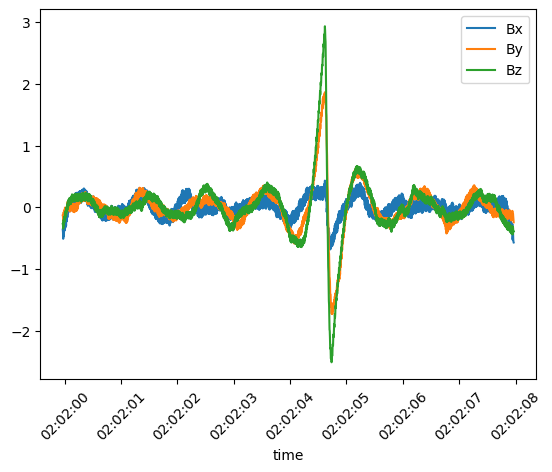
Example: reading non-ISTP Solar Orbiter LFR snapshots
This example shows a custom reader for Solar Orbiter RPW/LFR waveform snapshots. These files contain multiple snapshots at different sampling rates packed into a single CDF, so the standard reader cannot handle them.
import speasy as spz
from speasy.products import SpeasyVariable, VariableTimeAxis, DataContainer
from speasy.core.direct_archive_downloader import get_product
from speasy.core.any_files import any_loc_open
import numpy as np
import pycdfpp
import matplotlib.pyplot as plt

def snapshots_B_custom_reader(url, variable='B', sampling = 24576.):
    cdf=pycdfpp.load(any_loc_open(url,cache_remote_files=True).read())
    # all snapshots for different sampling rates are stored in the same variable
    # so we need to build an index of the snapshots with the desired sampling rate
    indexes = cdf["SAMPLING_RATE"].values[:] == sampling
    # build time axis from each snapshot start time and sampling rate
    star_times = pycdfpp.to_datetime64(cdf["Epoch"].values[indexes]).astype(np.int64)
    time = np.linspace(star_times, star_times+2048*int(1e9/sampling),num=2048).astype('datetime64[ns]').T.reshape(-1)
    sel_values = cdf[variable].values[indexes]
    values = np.empty((sel_values.shape[0]*sel_values.shape[2],3), sel_values.dtype)
    values[:,0] = sel_values[:,0,:].reshape(-1)
    values[:,1] = sel_values[:,1,:].reshape(-1)
    values[:,2] = sel_values[:,2,:].reshape(-1)
    if 'RTN' in variable:
        labels = ['Bxrtn', 'Byrtn', 'Bzrtn']
    else:
        labels = ['Bx', 'By', 'Bz']
    return SpeasyVariable(axes=[VariableTimeAxis(values= time)],values=DataContainer(values), columns=labels)


lfr_b_F2 = get_product(url_pattern="http://sciqlop.lpp.polytechnique.fr/cdaweb-data/pub/data/solar-orbiter/rpw/science/l2/lfr-surv-swf-b/{Y}/solo_l2_rpw-lfr-surv-swf-b_{Y}{M:02}{D:02}_v\d+.cdf",
                    start_time="2023-06-19T02:01:59",
                    stop_time="2023-06-19T02:02:08",
                    variable="B",
                    split_rule="regular",
                    split_frequency="daily",
                    use_file_list=True,
                    file_reader=snapshots_B_custom_reader,
                    sampling = 256.
                    )
plt.figure()
lfr_b_F2.plot()
plt.show()
This produces the following plot: